

Skribly Agent
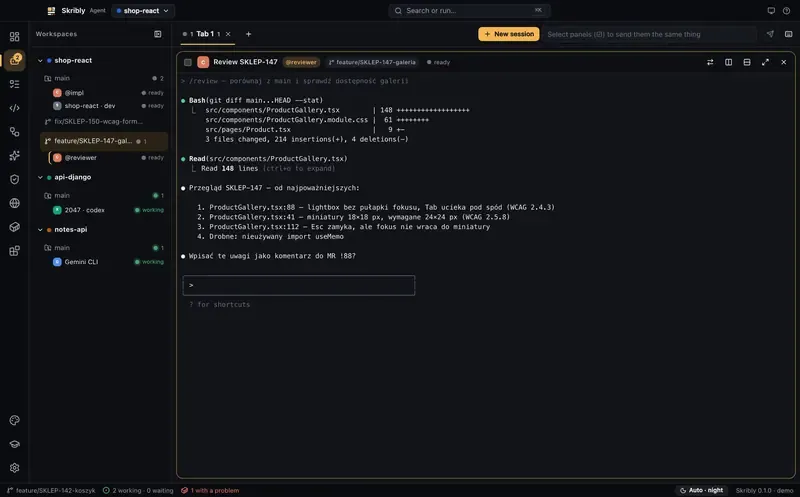
Skribly Agent is an IDE built around AI agents, not around files. It puts Claude Code, Codex, Cursor Agent, Gemini CLI and nine more side by side like a terminal multiplexer, with tracker tasks, git, pipelines, skills, audits and a preview browser in one window. It runs locally on macOS, Windows and Linux.
It replaces five terminals, task descriptions copy-pasted from a tracker into a chat, and one agent’s output pasted into another. It never adds a Co-Authored-By trailer nobody asked for.
In short
Section titled “In short”- Agents work side by side in tabs and split panes and tell you themselves when they are waiting for you.
- Tasks come from your tracker as files, not through copy-paste:
TASK.mdandSTATE.mdper task. - Agents hand work to each other through state files and pipelines instead of through you.
- Commits follow your repository’s style and never get AI trailers, including commits made by agents.
- Everything runs locally. No account, no telemetry; your agents use their own logins and API keys.
| Version | 1.0.37 (8 November 2026); every push to main builds a new 1.0.<build> release |
| Systems | macOS 12+ (Apple Silicon and Intel), Windows 10 and 11 (x64 and ARM64), Linux x64 (AppImage, .deb, .rpm) |
| Stack | Electron 45, React 19, TypeScript 7, Vite 8 |
| Interface languages | Polish and English, plus any other language through online machine translation that is cached for offline use |
| Telemetry | None |
| Licence | MIT |
Requirements
Section titled “Requirements”gitin yourPATH.- At least one coding agent, for example
npm install -g @anthropic-ai/claude-code. Skribly detects installed agents and shows the install command for missing ones. - No separate Node.js. The app runs its helpers with its own runtime.
ssh(OpenSSH) only if you want to run agents on remote machines.
Read next
Section titled “Read next”| Page | What it covers |
|---|---|
| Install | Files for each system, first launch, unsigned builds |
| Features | Code and git, tasks, pipelines, skills, audits, browser, Docker, CLI and MCP |
| Workspaces and panes | Workspaces, tabs, splits, agent states, notifications, worktrees |
| Terminals and sessions | New sessions, chat mode, resume after restart, SSH, broadcast, hand-off |
| Supported agents | The 13 agents, how to install them and what each one supports |
| Keyboard shortcuts | The Ctrl+B prefix and every global shortcut |
| Settings | Every section of Settings |
| Accessibility | Text size, high contrast, reduced motion, underlined links, focus |
| Updates | Auto-update, versions and release files |
| Troubleshooting | Common problems and their fixes |