

Features
Skribly Agent has one view per job, reachable from the sidebar, with ⌘1 to ⌘9 (Ctrl on Windows and Linux) or from the command palette ⌘K. Agents themselves are covered in Workspaces and panes and Terminals and sessions.
Dashboard
Section titled “Dashboard”Agents at work, tasks assigned to you, recent commits and token usage. Token usage is computed locally from the session files of Claude Code and Codex; nothing is sent.
A real IDE around the agents
Section titled “A real IDE around the agents”- A Monaco editor with tabs, quick open
⌘P, search in files⌘⇧F(ripgrep), side-by-side diffs and a bottom terminal. - Files changed by an agent reload automatically.
- Agent actions on selected code (
⌘⇧I): Explain, Fix, Write tests, Review, sent to a running agent or a new session. - The command palette
⌘Kreaches views, projects, actions and agents.
Code and git
Section titled “Code and git”- Changes and the index, branches, push and pull, a history graph of all branches, and pull requests through the GitHub CLI.
- Commit suggestions without a model. The pattern is learned from your history (
feat(scope): …,[KEY] …,KEY: …,#123 - …), with the language, type and scope taken from the changed files and the key from the branch name. The suggestion shows where each part came from. - Agent improves the suggested message from the staged diff, when you want it to.
- A commit hook strips AI trailers such as
Co-Authored-Byand “Generated with…”, including from commits that agents make in their terminals. Turn it on with Hook without AI trailers at the bottom of the changes panel. - Sign in to GitHub, GitLab, Bitbucket, Gitea or Azure DevOps to see real commit activity.
Tasks and trackers
Section titled “Tasks and trackers”- Jira (Cloud and Server/Data Center), Redmine, GitHub Issues, GitLab, Linear and Skribly Tracker in one list, plus local tasks. Skribly Tracker is the default tracker.
- Start with an agent writes the task to
.skribly/tasks/<KEY>/TASK.md, createsSTATE.md, a branch from your pattern (or a worktree) and launches the agent with a ready prompt, so the agent spends no tokens fetching the ticket. - Status changes, comments, assignment, new issues, search and time logging without leaving the app, where the tracker supports them.
- Tokens are encrypted with the system keychain. Agent sessions receive them as environment variables named the way agent-skills expects, so
/task 123works without a credentials file.
What each tracker supports in the app:
| Tracker | Key | Comment | Status | Assign | Create | Search | Log time |
|---|---|---|---|---|---|---|---|
| Skribly Tracker | AGENT-12 |
Yes | Yes | Yes | Yes | Yes | Yes |
| Jira | PROJ-123 |
Yes | Yes | Yes | Yes | Yes | Yes |
| Redmine | 2047 |
Yes | Yes | Yes | Yes | Yes | Yes |
| GitHub | owner/repo#12 |
Yes | Yes | Yes | Yes | Yes | No |
| GitLab | group/project#34 |
Yes | Yes | Yes | Yes | Yes | Yes |
| Linear | ENG-56 |
Yes | Yes | Yes | Yes | Yes | No |
.skribly/ is added to .git/info/exclude, so task files never end up in a commit.
Pipelines
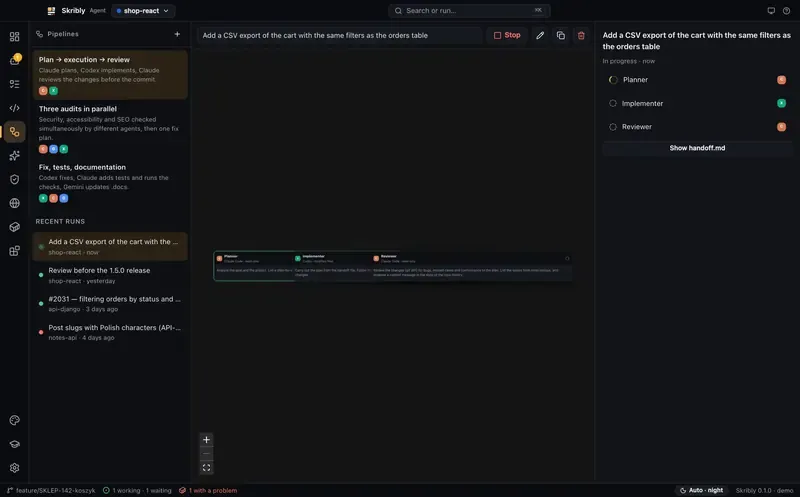
Section titled “Pipelines”A pipeline is several agents, from different vendors if you like, working toward one goal.
- Stages run in order; steps within a stage run in parallel.
- Each step is a headless agent that gets its role, the goal and the latest part of
.skribly/runs/<id>/handoff.md, not the previous agent’s whole conversation. That saves tokens and lets you mix vendors. - After a stage, every step’s answer is appended to
handoff.md. - A step marked changes files may edit; otherwise it runs read-only (for example Claude in
planmode, Codex with--sandbox read-only). - Built in: Plan → execution → review, Three audits in parallel, Fix, tests, documentation, or your own. Progress shows on a graph whose nodes can be resized and expanded.
Skills
Section titled “Skills”- Skills from agent-skills (
task,commit,review,handoff, audits,project-docsand more) installed with one click in each agent’s own format. - An agent can adapt the installed skills and
.tasks/workflow.mdto the project: check commands, base branch, branch and commit patterns, dev URL. - A
.docs/documentation skeleton generated from the repository. - The skills repository is
github.com/skribly/agent-skillsby default, or your own fork in Settings → Skills repository.
Audits
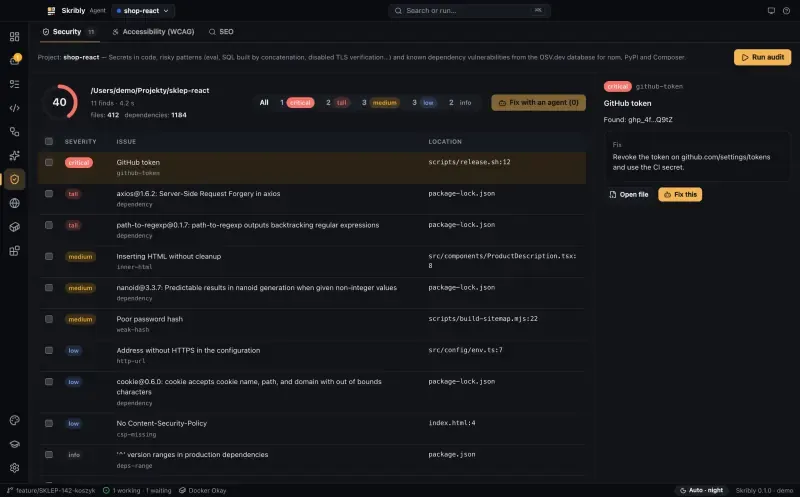
Section titled “Audits”The Audits view checks a project and a running site, gives each report a score from 0 to 100 and sends selected findings to an agent as a short task list.
| Tab | What it checks |
|---|---|
| Security | Secrets (masked in the report) and risky patterns in files tracked by git; vulnerable dependencies from OSV.dev for npm, PyPI and Composer lock files |
| Accessibility (WCAG) | axe-core against WCAG 2.2 A and AA, in a separate, sandboxed browser session |
| SEO | Technical SEO: meta tags, headings, canonical, robots.txt, sitemaps and up to 25 links |
Select findings and click Fix with agent (N), or Fix this next to one.
Browser
Section titled “Browser”- Preview your app at phone, tablet and laptop sizes, with DevTools and a screenshot for the agent.
- Claude, Codex, Cursor and Gemini tabs in separate profiles, so each keeps its own sign-in.
- Share browser with agents over the Chrome DevTools Protocol, for
chrome-devtools-mcpor Playwright MCP. It is off by default and listens on127.0.0.1only.
Docker
Section titled “Docker”Containers, compose projects and logs, with alerts when a container crashes or restarts in a loop.
Claude and Cursor integrations
Section titled “Claude and Cursor integrations”- Claude Code plugins from the Anthropic catalogue, installed and turned on or off per scope.
- MCP servers of Claude, Codex, Cursor and Gemini switched on and off with one toggle, without destroying their configuration.
- A Claude Design → code bridge and shortcuts to claude.ai.
- A Cursor tab: project rules (
.cursor/rules), Cursor’s MCP servers and Open in Cursor.
Themes, day and night
Section titled “Themes, day and night”- Themes from your VS Code, Cursor, Windsurf and VSCodium extensions, or downloaded from Open VSX. One theme colours the interface, the code editor and the terminals.
- Separate day and night themes that follow the system or switch from the status bar.
- Built-in themes: Skribly · Pergamin (light), Skribly · Atrament (dark) and Skribly · Wysoki kontrast (high contrast).
- Skribly picks an accent with at least 3:1 contrast against the background, and text on accent buttons with at least 4.5:1, so no theme produces unreadable buttons.
- Themes are only read as JSON; code from extensions is never run.
CLI and MCP
Section titled “CLI and MCP”Agents can drive other agents through a local control API. It listens on 127.0.0.1 only, on a random port, with a random token in ~/.skribly/control.json (permissions 600).
skribly agent start reviewer --kind claude \  --project . --prompt "Review the changes in git diff"skribly agent wait reviewer --until done --timeout 600skribly agent read reviewer --lines 60
claude mcp add skribly -- skribly mcp| Command | What it does |
|---|---|
skribly status |
Number of panes and agents and their states |
skribly workspace list |
Projects, their worktrees and the panes in each |
skribly pane create, run, read, wait-output, rename, close |
Shell panes |
skribly agent start <name> --kind <agent> |
A named agent in a new pane, optionally in a worktree (--worktree BRANCH) or on an SSH machine (--machine M) |
skribly agent prompt <target> <text> [--wait] |
Sends a message and optionally waits for the end of the turn |
skribly agent wait <target> [--until done,idle,blocked] |
Waits for a state |
skribly agent read, explain, stop |
Reads the screen, explains the state, ends the agent |
skribly worktree list, create, remove |
Worktrees of a project |
skribly notify |
A notification from an agent or a script |
skribly mcp |
The same operations as MCP tools (skribly_*) |
Turn it on in Settings → Sessions & control → Local control API (on by default), and add the command to your PATH with skribly command → Install. The command only works while Skribly is running and needs no separate Node.js.